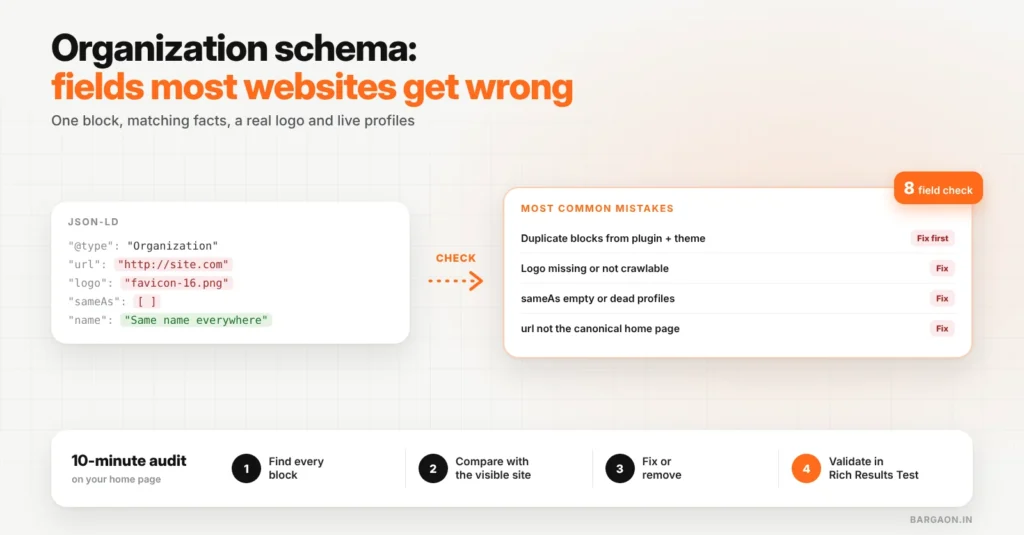
Organization schema tells search engines who runs a website: name, logo, URL, contact details and official profiles. The fields most sites get wrong are the logo (missing or not crawlable), sameAs (missing or pointing to dead profiles), url (not matching the real canonical address) and duplicate Organization blocks from different plugins that contradict each other. Fix those and your markup does its job.
Key takeaways
- Organization schema is a short block, but small mistakes make it confusing or useless.
- Check for duplicate blocks first: SEO plugins and themes often both add one.
- Every field must match what the visible site says.
- Use the 8-field check below and validate with Google’s Rich Results Test.
This goes one step deeper than our post on what an entity is in SEO. For schema in general, see our entity SEO and structured data guide.
What Organization schema is for
Google’s Organization structured data documentation explains that this markup helps Google understand an organisation’s details, such as its logo and contact information, and can help it show the right details in search features. It is usually added once, on the home page or About page.
The 8 fields, and the mistakes we see most
| Field | Common mistake | Fix |
|---|---|---|
@type |
Generic Organization for a shop or clinic with a physical location | Use a more specific type, such as LocalBusiness or a subtype, when you serve customers at an address |
name |
Different from the name on the site, profiles or invoices | Use one exact name everywhere |
url |
http vs https, or www vs non-www, not matching the canonical home page | Use the exact canonical home URL |
logo |
Missing, an SVG blocked from crawling, or a tiny favicon | A crawlable image file that meets Google’s logo guidelines |
sameAs |
Missing, or links to closed or personal profiles | List only live, official profiles (LinkedIn page, Instagram, YouTube, Google Business Profile) |
address |
Old address, or a format that does not match Google Business Profile | Same address, same format, everywhere |
telephone / contactPoint |
Personal mobile or a number no one answers | The main business number, with country code |
| Duplicate blocks | An SEO plugin and the theme both output Organization with different values | Keep one source; turn the other off |
Generate clean Organization schema
Fill in the fields once and get valid JSON-LD with our free Schema Generator.
The 10-minute audit
Find, compare, fix, validate
Use the Rich Results Test or the Schema.org validator on your home page.
- Find: run your home page through Google’s Rich Results Test and note every Organization or LocalBusiness item it finds.
- Compare: check each field against your footer, Contact page and Google Business Profile.
- Fix: correct values in your SEO plugin or theme settings; switch off the duplicate source.
- Validate: test again, then check Search Console’s enhancement reports over the next few weeks.
Example (illustrative)
An Indore furniture store had two Organization blocks: one from its SEO plugin with the old shop address, one from the theme with the new address and no logo. Turning off the theme’s block, updating the plugin’s address and adding a proper logo file left one clean, consistent block.
The Bargaon view
Organization schema is ten minutes of work that most sites get slightly wrong. One block, matching facts, a real logo and live profiles is all it needs. Our structured data guide covers other schema types, and our technical SEO service can audit your markup across the site.
Rebuild your schema in a minute
Use the Schema Generator, then see our technical SEO service for a full structured data audit.
FAQs
Where should Organization schema go?
Usually on the home page or About page, once. It does not need to be repeated on every page.
Organization or LocalBusiness: which should I use?
Use LocalBusiness or one of its subtypes if customers visit you at an address or you serve a local area. Use Organization for businesses without a customer-facing location.
Can wrong schema hurt my site?
Markup that does not match the visible page can be ignored, and misleading markup can lead to a manual action. Accurate, matching markup is the safe approach.
Sources
- Google Search Central: Organization structured data (checked 10 Nov 2026)
Last updated: 10 November 2026. How we researched: Google’s Organization structured data documentation plus Bargaon’s audit checklist described above.
Digital Marketing & SEO Specialist
Himanshu Patni has spent more than nine years in search and growth marketing, watching discovery move from ten blue links to AI answers. His work brings SEO, AEO and GEO together with paid media and measurement as one system. At Bargaon, he writes about where search is heading and what businesses should do before the shift becomes obvious.