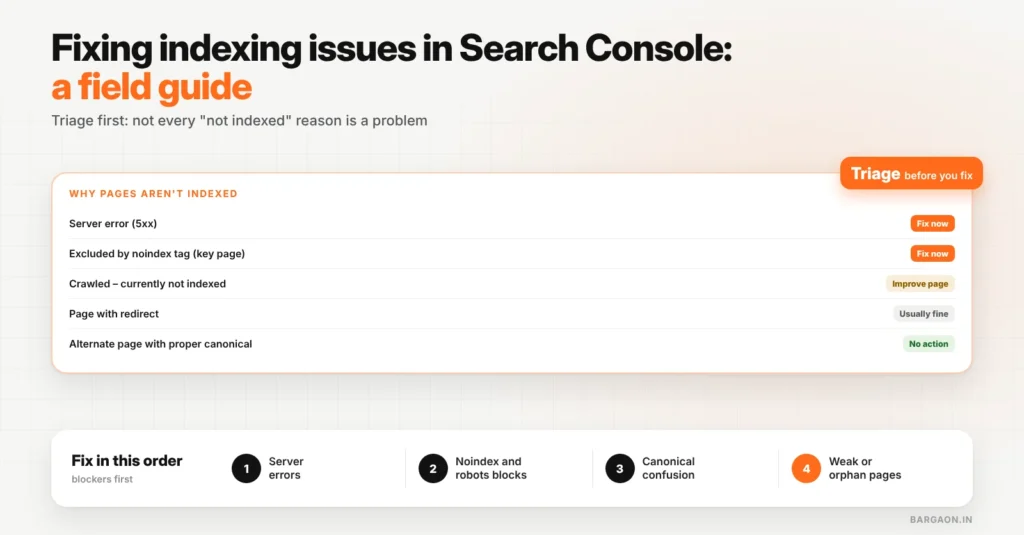
To fix indexing issues in Search Console, open the Pages report, sort the “Why pages aren’t indexed” reasons by how many important pages they affect, and fix only what matters: server errors, wrong noindex tags, robots.txt blocks and weak pages Google crawled but chose not to index. Many listed reasons, such as redirects and alternate pages with a proper canonical, are normal and need no action.
Key takeaways
- Not every “not indexed” reason is a problem. Some are Search Console reporting normal behaviour.
- Start with pages that should earn traffic or leads. Ignore tag pages, filters and old URLs that redirect.
- Use the triage table below to match each reason to its likely cause and fix.
- After fixing, use “Validate fix” and give Google time; re-checking daily does not speed it up.
This field guide sits under our technical SEO guide. If you are unsure whether crawling is the issue at all, our post on crawl budget covers that first.
Step 1: decide which pages should be indexed
Make a short list of the pages that matter: home, service pages, key guides, product or category pages. Indexing problems on these come first. Google’s Page indexing report help page notes that it is normal for some URLs not to be indexed, such as duplicates and pages you have chosen to exclude.
Step 2: triage the reasons
| Reason in Search Console | Usually means | Fix | Priority |
|---|---|---|---|
| Server error (5xx) | Your server failed when Google visited | Check hosting, caching and plugin errors; test the URL live | High |
| Excluded by “noindex” tag | A page tells Google not to index it | Remove noindex from pages that should rank; leave it on thank-you and admin pages | High if a key page |
| Blocked by robots.txt | Crawling is blocked | Unblock key pages; keep blocks only for areas you never want crawled | High if a key page |
| Crawled – currently not indexed | Google saw the page but did not think it worth indexing yet | Improve content, merge thin pages, add internal links | Medium |
| Discovered – currently not indexed | Google knows the URL but has not crawled it yet | Add internal links from strong pages; check server speed | Medium |
| Duplicate, Google chose different canonical than user | Google thinks another URL is the main version | Make the preferred page clearly better or merge them; align canonical and internal links | Medium |
| Not found (404) | The URL no longer exists | Redirect only if it had links or traffic; otherwise fine | Low |
| Page with redirect | The URL redirects elsewhere | Usually normal; update internal links to the final URL | Low |
| Alternate page with proper canonical tag | Google is following your canonical | No action | None |
Check a redirect before you fix it
See every hop and the final status code of any URL with our free Redirect Checker.
Step 3: fix in this order
Blockers first, quality last
Fix technical blockers before rewriting content: no amount of good writing helps a page Google cannot reach.
Example (illustrative)
A Pune coaching institute saw 300 pages “not indexed” and panicked. Triage showed 210 were tag and date archives (fine to leave), 60 were old URLs redirecting (fine), and 30 were course pages marked “Crawled – currently not indexed”. Those 30 had two-line descriptions. Adding fees, batch timings, faculty and FAQs to each, and linking them from the main courses page, was the real fix.
Step 4: validate and wait
- Use URL Inspection → Test live URL on one fixed page to confirm Google can now fetch and index it.
- Click “Validate fix” on the reason in the Pages report.
- Check again after a week or two. Validation can take time, especially for “Crawled – currently not indexed”.
A 20-minute weekly routine
- Pages report: any new reason, or a jump in an existing one?
- URL Inspection on the newest important page you published.
- Crawl stats: host status still healthy?
- Note any change in your SEO log so you can link drops to causes later.
The Bargaon view
Indexing reports look alarming because they list everything, including normal behaviour. Triage first, fix blockers before content, and focus on the pages that should bring business. Our technical SEO guide covers the wider setup, and our technical SEO service can run the triage for you.
Stuck on an indexing issue?
Send us a screenshot of your Pages report and we will tell you which reasons matter. See our technical SEO service.
FAQs
Why are my pages not indexed by Google?
Common reasons are server errors, a noindex tag, robots.txt blocks, duplicate content or pages Google sees as low value. The Pages report in Search Console names the reason for each URL.
Is “Crawled – currently not indexed” a penalty?
No. It means Google visited the page but chose not to index it for now, usually because it sees little unique value. Improving the page and linking to it often helps.
How long does indexing take after a fix?
It varies from days to a few weeks. Use “Validate fix” and URL Inspection, then check back after a week or two rather than daily.
Sources
- Google Search Console Help: Page indexing report (checked 9 Nov 2026)
Last updated: 9 November 2026. How we researched: Google’s Search Console documentation plus Bargaon’s triage method described above.
Digital Marketing & SEO Specialist
Himanshu Patni has spent more than nine years in search and growth marketing, watching discovery move from ten blue links to AI answers. His work brings SEO, AEO and GEO together with paid media and measurement as one system. At Bargaon, he writes about where search is heading and what businesses should do before the shift becomes obvious.