Crawl budget is how many pages Googlebot can and wants to crawl on your site in a given time. Google says most sites do not need to worry about it: it mainly matters for very large sites (around a million pages or more) or medium sites (around 10,000+ pages) whose content changes daily. If your site has a few hundred pages and new pages get indexed within days, crawl budget is not your problem; page quality and internal links usually are.
Key takeaways
- Crawl budget = what your server can handle plus how much Google wants your pages.
- Small and mid-size business sites rarely hit a crawl budget limit.
- Slow new-page indexing on a small site usually points to weak pages, thin internal links or server errors, not budget.
- Use the 5-minute Search Console check below before spending any time on “crawl budget optimisation”.
This post is a plain-English companion to our technical SEO guide. If you are not sure whether crawling is your problem, start here.
What crawl budget actually is
Google’s documentation on managing crawl budget describes it as two things working together:
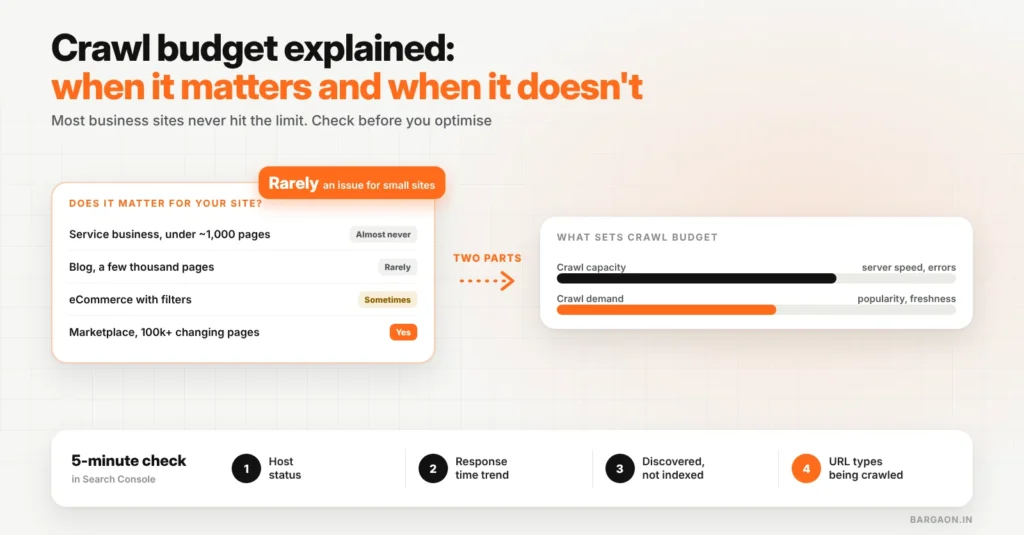
- Crawl capacity: how fast Googlebot can crawl without overloading your server. Fast, error-free responses raise it; slow responses and server errors lower it.
- Crawl demand: how much Google wants to crawl your URLs, based on how popular and how fresh they are.
The same Google page says the guide is meant for large sites and frequently updated medium sites, and that sites with fewer pages that get crawled the same day they are published do not need it.
Does crawl budget matter for your site?
| Your site | Crawl budget a real issue? | Focus on instead |
|---|---|---|
| Service business, under ~1,000 pages | Almost never | Page quality, internal links, server errors |
| Blog or content site, a few thousand pages | Rarely | Removing thin or duplicate posts, sitemaps |
| eCommerce with filters and many URL variants | Sometimes | Controlling filter and sort URLs, canonical tags |
| Marketplace or classifieds, 100k+ changing pages | Yes | Everything in Google’s crawl budget guide |
The 5-minute crawl check in Search Console
Four things to look at, in order
Green host status + steady response time + few “discovered, not indexed” pages = crawl budget is not your problem.
- Settings → Crawl stats → Host status. Any problems with robots.txt fetching, DNS or server connectivity matter more than budget.
- Average response time. If it climbs, Google may slow crawling. On shared hosting, caching and a lighter theme often fix this.
- Pages report. A large “Discovered – currently not indexed” count on a big site can mean Google is not getting to pages. On a small site it more often means Google does not think the pages are worth indexing.
- Crawl requests by file type and purpose. If most crawling goes to filter URLs, old parameters or redirects, that is wasted effort worth fixing.
Check your redirects in a minute
Redirect chains waste crawling and slow pages. Test any URL with our free Redirect Checker.
Common crawl budget myths
- “Adding a sitemap increases crawl budget.” A sitemap helps Google find URLs; it does not raise the limit.
- “Noindex saves crawl budget.” Google still has to crawl a page to see the noindex tag. Blocking in robots.txt stops crawling, but then Google cannot see the page content at all, so use it only for URLs you never want crawled.
- “Small sites should prune pages for crawl budget.” Prune weak pages because they are weak, not because of budget.
Example (illustrative)
A Ludhiana textile exporter with 180 pages was told its “crawl budget was exhausted” because 40 product pages were not indexed. Search Console showed fast responses and a healthy host. The 40 pages were near-duplicates with one-line descriptions. Merging them into 12 detailed pages got them indexed; crawl budget was never the issue.
When it does matter: what to fix first
- Stop infinite URL spaces: filter, sort and session parameters that create endless variants.
- Fix redirect chains and long lists of 404s linked from your own site.
- Keep server responses fast and error-free, especially during sale traffic.
- Keep sitemaps limited to canonical, indexable URLs with accurate last-modified dates.
The Bargaon view
For most Indian business sites, crawl budget is a distraction. Run the 5-minute check; if the host is healthy and pages are reasonably fast, spend your time on page quality and internal links. If you run a large catalogue or marketplace, it is worth a proper audit. Our technical SEO guide covers both cases, and our technical SEO service can run the audit for you.
Not sure if crawling is your problem?
Send us your site and we will run the 5-minute check and tell you what to fix first. See our technical SEO service.
FAQs
Do small websites need to worry about crawl budget?
Usually not. Google says crawl budget mainly matters for very large sites or medium sites with content that changes daily. Small sites should focus on page quality and internal links.
How do I check my crawl budget?
Google does not show a single number. Use the Crawl stats report in Search Console to check host status, response times and what is being crawled, then the Pages report for indexing gaps.
Does page speed affect crawling?
Yes. Google says faster, error-free server responses let it crawl more, while slow responses and server errors make it crawl less.
Sources
- Google Search Central: Large site owner’s guide to managing your crawl budget (checked 8 Nov 2026)
Last updated: 8 November 2026. How we researched: Google’s own crawl budget documentation plus Bargaon’s audit checklist described above.
Digital Marketing & SEO Specialist
Himanshu Patni has spent more than nine years in search and growth marketing, watching discovery move from ten blue links to AI answers. His work brings SEO, AEO and GEO together with paid media and measurement as one system. At Bargaon, he writes about where search is heading and what businesses should do before the shift becomes obvious.