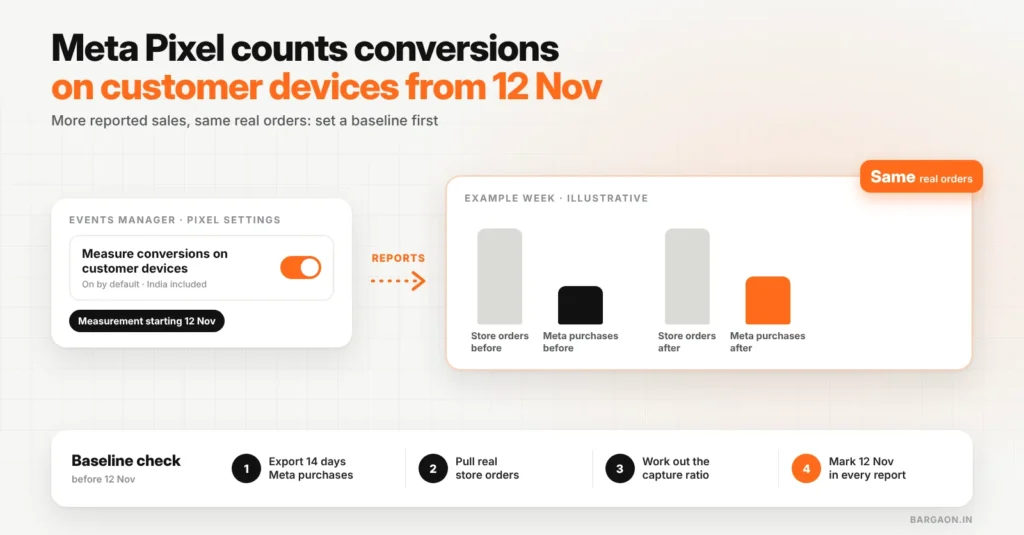
From 12 November 2026, a new Meta Pixel setting called “Measure conversions on customer devices” starts counting some website purchases on the shopper’s own phone or computer. It is switched on by default for eligible pixels, and it is not active for people in the EU and UK, so Indian pixels are included. Your reported conversions and ROAS may rise without any change in real sales. Record a baseline now, decide per pixel whether to keep it on, and judge results on your own order data.
Key takeaways
- The change is in counting, not in buying behaviour: Meta says it recovers purchases that never reached its reports.
- It is on by default, with no opt-in step. You can switch it off per pixel in Events Manager.
- Expect a break in your trend lines from 12 November. Mark the date in every report.
- Use the baseline ratio below (Meta-reported purchases ÷ real orders) to see how much of any jump is new counting.
If you run Meta ads for an online store, this sits next to everything in our Meta ads guide: the campaign setup stays the same, but the numbers you use to judge it are about to move.
What exactly is changing on 12 November?
Meta has added a Pixel setting in Events Manager. With it on, the match between an ad view and a purchase can happen on the customer’s device, using details the customer already gave the store (such as an email) plus temporary device data, instead of only on Meta’s servers. PPC Land reported that the panel shows “Measurement starting November 12, 2026” under the toggle. Meta’s Business Help Center says the feature is on by default for eligible pixels, is not active for people in the EU and UK, and works alongside your existing Pixel and Conversions API rather than replacing them, as Relevant Audience summarised from Meta’s help pages. The tagging vendor Stape also lists 12 November as the rollout date and expects more attributed conversions and value.
| Item | From 12 Nov |
|---|---|
| Where some matches happen | On the shopper’s device as well as Meta’s servers |
| Default | On for eligible pixels; you can turn it off |
| India | Included (only EU and UK are excluded) |
| Pixel and Conversions API | Keep working as before |
| Your real sales | Unchanged: only the reporting moves |
Why the timing matters for Indian advertisers
The switch lands in the middle of the year-end sale and wedding season, when budgets are set from recent ROAS. If reported ROAS jumps on 12 November, it is easy to scale a campaign that has not actually improved. Agencies face a second risk: a client comparing November with October will see a lift that is partly a counting change.
Example (illustrative)
A Surat ethnic-wear D2C brand sees Meta report 120 purchases in the week before 12 November and 150 the week after, while Shopify shows 300 orders both weeks. Meta’s share of orders “rose” from 40% to 50%, but the store did not sell a single extra order. Without a baseline, the team would raise budgets on a number that only changed because the counting did.
The 4-step baseline check (do it before 12 November)
Four steps, about 30 minutes
Capture ratio = Meta-reported purchases ÷ store orders. Compare it before and after 12 Nov.
- Export Meta-reported purchases and purchase value per day for the last 14 days, using your usual attribution setting.
- Pull real orders and revenue for the same days from Shopify, WooCommerce or your order system, ideally split by UTM source. Our UTM tracking guide covers the tagging.
- Calculate the capture ratio for each day and the 14-day average.
- After 12 November, track the same ratio. If Meta purchases rise but store orders do not, the gap is the new counting, not new demand.
Know your real break-even ROAS before the numbers move
Work out the ROAS you need from your margin, so a reporting jump does not push you into unprofitable spend.
Keep it on or switch it off?
| Your situation | Suggestion | Why |
|---|---|---|
| Brand that judges Meta on store orders or blended ROAS | Keep on | More matched purchases can help delivery; you already check against real orders |
| Agency or team that reports Ads Manager ROAS to a client | Keep on, but warn the client and mark 12 Nov; or switch off until December | Avoids a “results improved” story that is really a counting change |
| Brand mid-test (new creative or budget test running across 12 Nov) | Switch off until the test ends | A measurement change mid-test makes the result unreadable |
| Lead-generation sites with no online purchase | Check, but low impact expected | Reports focus on website purchases; keep importing qualified leads as before |
Whatever you choose, keep your attribution setup anchored on orders and margin, not on the platform’s own number.
Where to find the setting
- Open Events Manager and select your pixel or dataset.
- Go to Settings and look below the Meta Pixel section for “Measure conversions on customer devices”.
- Turn it off or leave it on. Note the decision and the date in your reporting sheet.
The Bargaon view
This is a reporting change dressed as a performance change. It may well recover real conversions Meta was missing, which can help its delivery, but the reported lift is not new revenue. Set the baseline this week, keep one number from your own store at the top of every report, and read November and Black Friday against that. If you want a second pair of eyes on your setup, our Meta ads management team can review it; the Meta ads guide covers the rest.
Check your break-even ROAS for the sale season
Plug in price, margin and costs, then compare against your capture ratio. Need help? See our Meta ads service.
FAQs
Does this change apply to Meta Pixels in India?
Yes. Meta says the feature is not active for people in the EU and UK; India is not excluded, so eligible Indian pixels have it on by default.
Will my sales go up because of this setting?
No. Your real orders stay the same. Meta may report more purchases because it can now match some it previously missed.
Can I turn it off?
Yes. Meta says you can switch it off at any time in Events Manager under your pixel’s settings.
Sources
- PPC Land: Meta Pixel will count more conversions from Nov 12 (October 2026)
- Relevant Audience: summary of Meta’s Business Help Center articles on the setting (28 Oct 2026)
- Stape: Meta on-device conversion measurement (22 Oct 2026)
Last updated: 7 November 2026. How we researched: industry reporting that quotes Meta’s Events Manager panel and Business Help Center pages, checked on 7 November 2026. Meta’s help pages give no rollout date; the 12 November date comes from the Events Manager panel.
Digital Marketing & SEO Specialist
Himanshu Patni has spent more than nine years in search and growth marketing, watching discovery move from ten blue links to AI answers. His work brings SEO, AEO and GEO together with paid media and measurement as one system. At Bargaon, he writes about where search is heading and what businesses should do before the shift becomes obvious.